Configurator

tiskin.app — the TI-SKIN® energy configurator

Location, building, surfaces, existing insulation, use of the rooms: the configurator picks the model, simulates the whole year with hourly climate data and prepares the report. Free, in Italian and English.

One of a kind

The only company in the world with a program like this

No other insulation manufacturer offers a configurator that simulates the dynamic behaviour of its own material on the customer's building, hour by hour, with the real climate of the location, and returns model, quantities, savings and report in a few minutes. The TI-SKIN configurator is developed by Pure Organica Corp. with Syndego Italia and Syndego LLC and is the tool we work with every day.

It serves designers for a first check, installers for quantities and installation drawings, dealers for a technical answer at the counter, owners to understand what TI-SKIN can do on their own home.

To use it you register with name and email: you will receive assistance and the answer to your request. Version 4.36 of 12 September 2026.

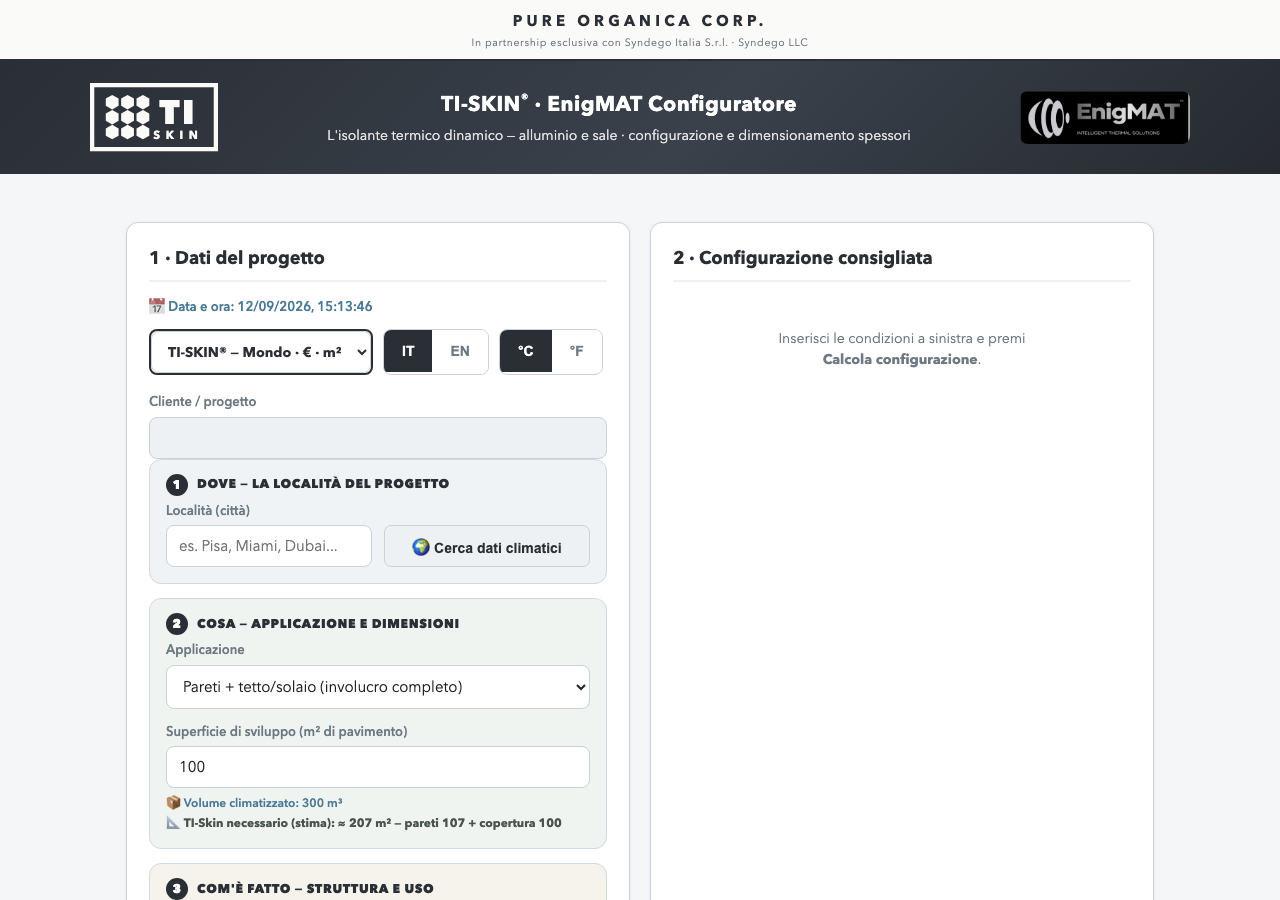
Screenshot of the tiskin.app configurator
The configurator in the Aluminium and Salt look, with the two brands: TI-SKIN® for the world (€, m²) and EnigMAT™ for the United States ($, sq ft).
What it does

Three things no static calculation does

It picks the model

From the climate, the application and the position in the envelope the program proposes the right model (Comfort 18, 23 or 28, Cold −20 or −23) and the standard weight version; it flags the specific cases that need a heavier grade.

It simulates the whole year

With the hourly climate data of the location it calculates, hour by hour, the thermal balance of the building with and without TI-SKIN: heating and cooling consumption, typical days of each month, comfort line, effect of night ventilation. It compares the three Comfort models and picks the best.

It prepares the report

Nine printable pages: recommended configuration, envelope table with U-values before and after, twelve-month charts, installation drawings, method and assumptions, customer data and offer-acceptance page with the general terms of supply.

How to use it

Eight steps, ten minutes

1Register

On first opening the program asks for company or name, email and contact details. It is for assisting you and answering your request: no newsletter, no public prices.

2Choose the brand

The first drop-down at the top: TI-SKIN® — World (euro, Celsius, square metres) or EnigMAT — USA (dollars, Fahrenheit, square feet). Units follow the brand, the language only changes the words.

3Where: the location

Type the city and press Enter: the program loads the hourly climate of the location and sets the destination tax rate. Pisa, Milan, Aosta, Miami, Dubai: anywhere.

4What: application and dimensions

Walls plus roof, roof only, ceiling, cold room, A-frame house with its measurements. Floor area, storeys, height: the program estimates the surface to cover.

5How it is built: structure and use

Type of structure, existing insulation with its R-value (both European units and US R-value), use of the rooms, ventilation (none, natural, summer night free cooling).

6Calculate

The program proposes the recommended model with the core temperature, the version, the quantity and summer-plus-winter protection. If the case is unusual it says so.

7Run the energy configuration

The whole-year simulation starts: estimated savings, monthly charts, typical days with the green comfort line, comparison with and without TI-SKIN. Change a drop-down and run again: the effect shows immediately.

8Approve and print

"Approve" opens the job with the customer data; "Print client report and offer acceptance" produces the nine-page PDF. Jobs stay in the archive and reopen complete with configuration and simulation.

A real example

The report the configurator delivers

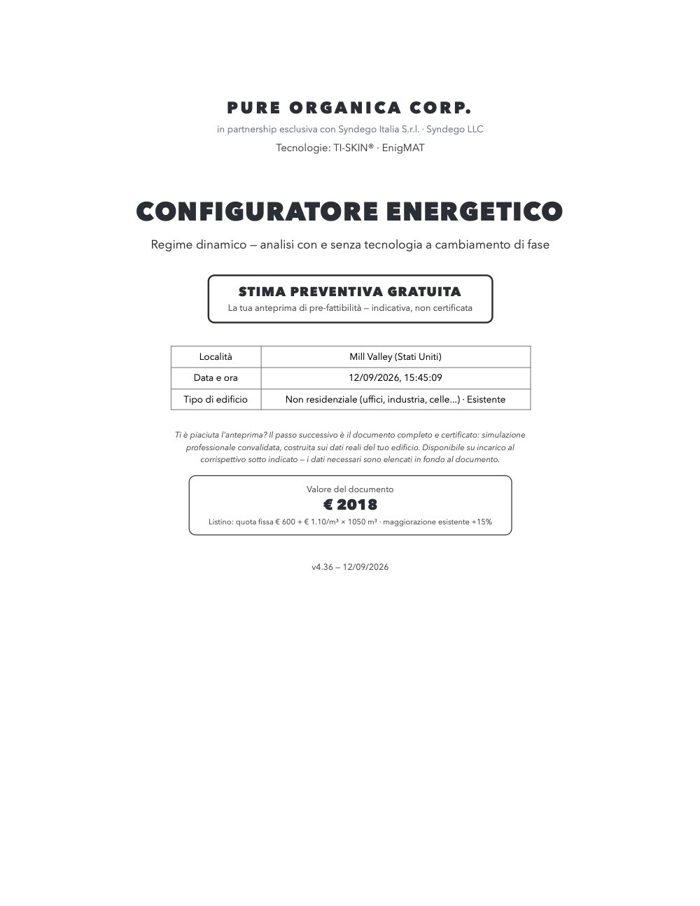
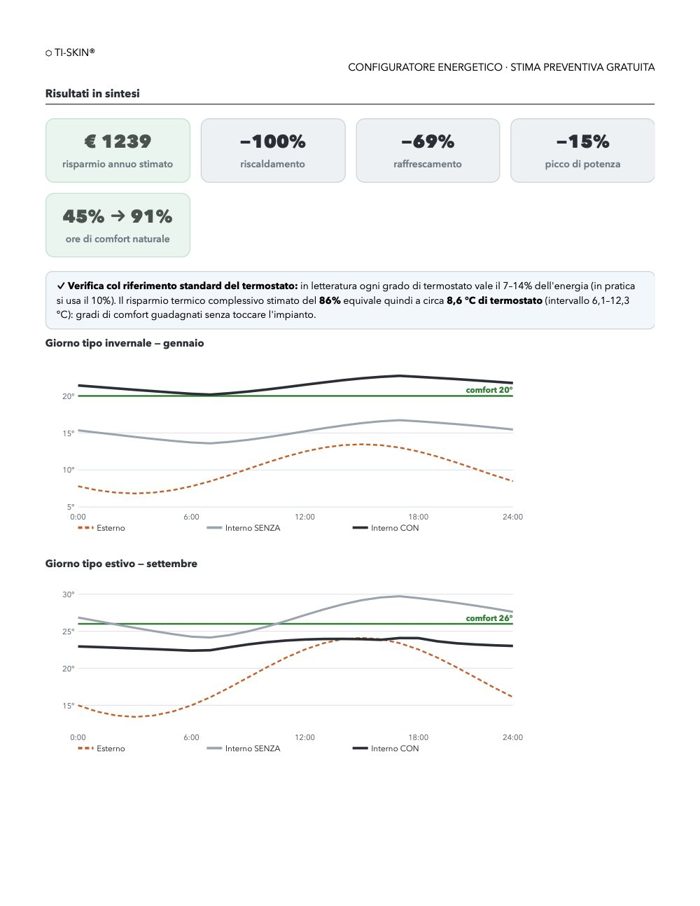
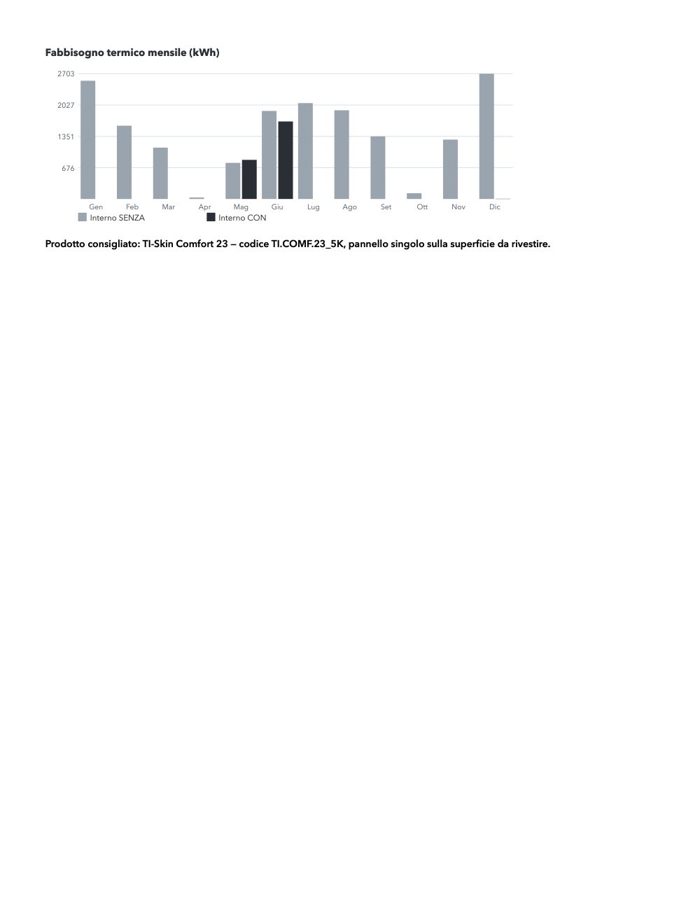
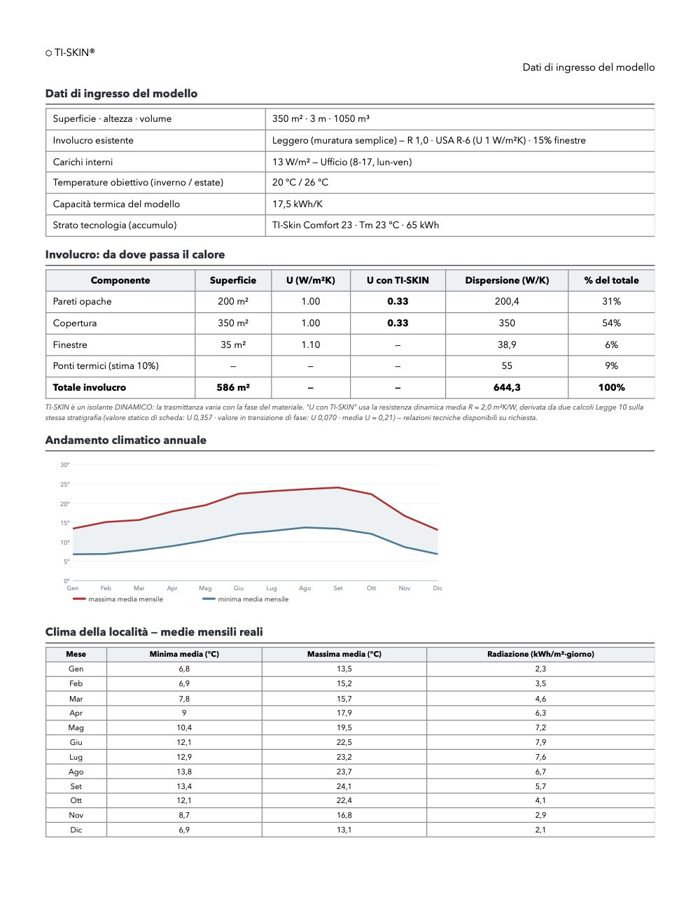
Nine pages, produced by the program on a test building: the cover with the value of the certified document, the recommended configuration, the envelope table with U-values before and after, the twelve-month and typical-day charts, the installation drawings, the method, the customer data and the offer-acceptance page. This is the free pre-feasibility document; on engagement it becomes the certified professional simulation, with a signed report and the real data of the building.

Report, page 1
1 · Cover and value of the document
Report, page 2
2 · Recommended configuration
Report, page 3
3 · Envelope and U-values
Report, page 4
4 · The whole year, month by month

Example generated on the program's test bench (existing non-residential building, 350 m²): the figures illustrate the document, not a real case.

Reading the results

What the numbers mean

The recommended model

The number is the temperature the core works at. For roofs the program raises the target towards the outdoor maximum, which is why attics get Comfort 23 and 28; for internal walls often Comfort 18 or 23. The choice is validated by the hourly simulation: the model only changes if the advantage is clear.

U with TI-SKIN

In the envelope table every covered surface shows the transmittance before and after. TI-SKIN is dynamic: the program uses a conservative average additional resistance, approved by the technical office, valid for all weight versions. Weight acts on the time shift.

The savings

They are the difference between the consumption of the bare building and with TI-SKIN, in energy and in money, over the whole year, heating and cooling separately. They depend on climate, stratigraphy and use: two identical houses in two different cities give different numbers, and rightly so.

Ventilation and typical days

Summer night ventilation discharges the core with cool air: it reduces the consumption of the whole house, even without TI-SKIN, which is why the savings attributable to the panel can look smaller. Typical days show, month by month, the outdoor temperature, the indoor one and the comfort line.

The report is a configuration, not a certified calculation: for filings and detailed design the configurator points to the certified professional simulation service, with a signed report, and its fee. List prices do not appear: the quotation is made by the technical office on the approved configuration.

Pure Organica Corp.
Partner for commercial development, engineering and projects: Pure Organica Corp.

2140 S Dupont Hwy, Camden, DE 19934 · United States
www.pureorganica.us · info@pureorganica.us

Documents to download

The full series is on the Documents page. Price list and terms of supply on request.

Request an assessment

Every building and every process has its own configuration. Tell us about yours: we reply with a first technical assessment, no strings attached.